
Pencil.dev - The Agentic Design Tool That Actually Feels Like Magic
A swarm of AI agents designing on a canvas, coordinating like a real team - and it all converts to code. I tested it.

Every few months, a tool comes along that makes you rethink what an AI interface can be. Pencil.dev is that tool right now. I recently tested it out and came away genuinely impressed - not just by what it does, but by how it does it.
What is Pencil?
Pencil is an agent-driven design canvas that lives right inside your IDE. Think of it as a design tool — but instead of switching between Figma and your code editor, you design on an infinite canvas directly within Cursor or VS Code. It is built around an open, platform-agnostic file format and uses AI agents to do the heavy lifting.
But what really sets it apart is not the “what” - it’s the “how.”
The Swarm Mode - Where It Gets Wild
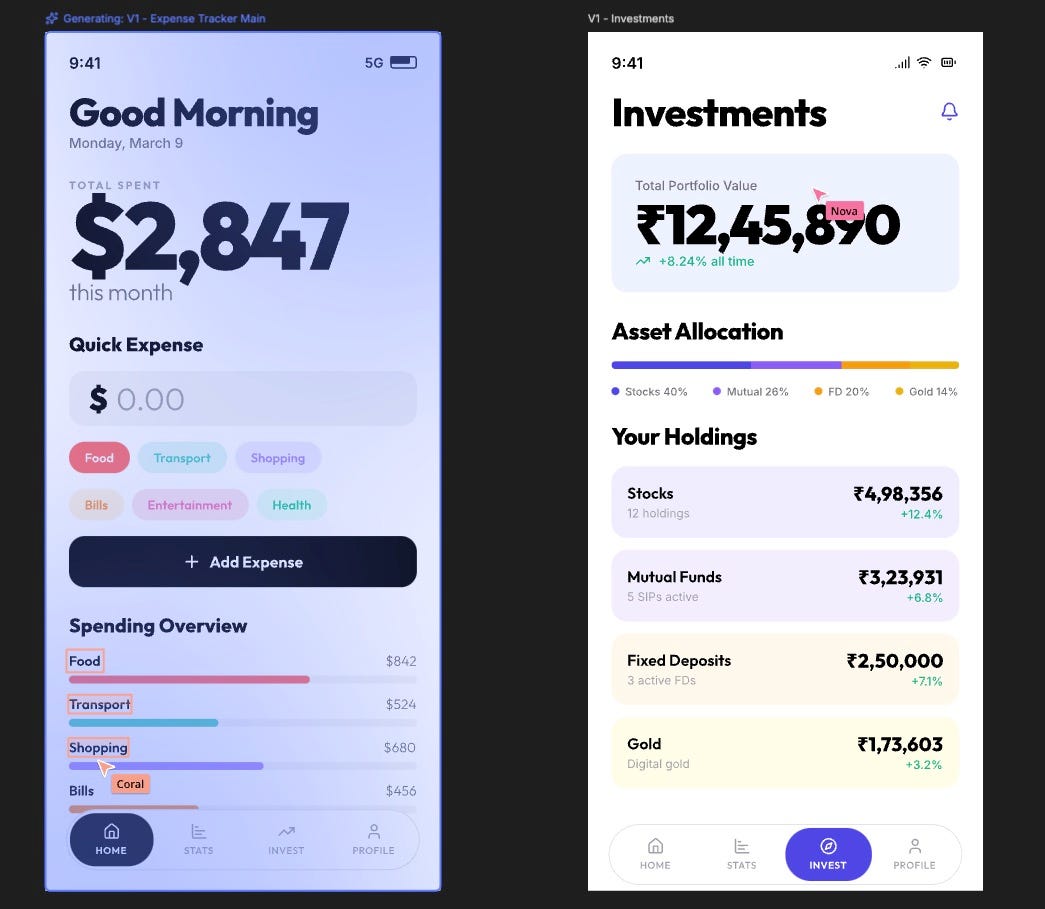
This is the part that made my jaw drop. When you give Pencil a design task, it doesn’t just spin up one AI model and show you a loading bar. It deploys a swarm of AI agents - up to six at a time right now - that all work together on the canvas simultaneously.
Each agent has its own cursor on screen. One master agent directs the whole operation while the others coordinate, divide the work, and execute in parallel. You can literally watch them move around the canvas, placing elements, adjusting layouts, working on different parts of your design - all at once. It feels less like using a tool and more like watching a team of designers collaborate in real time. It is genuinely mesmerizing and unlike anything I have seen in the AI chat interface space.
Most AI tools today give you a chatbot or a terminal. Pencil reimagines the interface entirely - the agents have a human-like presence with real cursors, making the whole experience a treat to watch rather than a waiting game.
Under the Hood - The .Pen File Format
Behind the visual spectacle, Pencil keeps things surprisingly simple on the backend. It generates a JSON-based, platform-agnostic file with a .Pen extension. This is a fully open design format - you can read, debug, or extend the design files with your own tools (project itself is not open sourced). No black box, no lock-in.
The .Pen file can be used across other IDEs like Cursor - just add the Pencil plugin, and it becomes a mini design platform embedded within your coding interface (VS Code & Cursor for now). Your design files live in your repo, versioned and branched with Git, just like your code. Design and code finally live under one roof.
From Design to Code - In a Jiffy
Here is where the real workflow magic happens. Once your design is ready on the canvas, you simply instruct your coding agent - whether that is Cursor’s Composer, Claude Code, or OpenAI Codex - to convert the .Pen file into actual code. React, Tailwind, plain HTML/CSS - pick your stack, and it generates testing-ready code that stays true to the design, pixel-perfect.
No more design handoffs. No more “the developer didn’t match the Figma.” The design and the code are always just one tab-click apart.
Note: Whatever I tested are fairly simple usecases, a pro-designer may disagree, but coming from a full stack developer background, I can see the potential in this is and we’ll definitely be seeing deployable ready design systems soon.
Bring Your Own Design System
Pencil also supports design systems, so you are not forced into someone else’s component library. You can plug in your team’s existing design system straight from the codebase and maintain your own brand standards. It also comes with curated, component-based design kits built in - giving you the craft and taste of a senior designer at your fingertips even if you are an engineer working solo.
MCP Integration and Extensibility
Pencil is built as a bi-directional MCP (Model Context Protocol) vector canvas. It does not just provide read-only tools - it gives full write access along with a suite of tools to fully operate the canvas. You can plug in the whole world of MCPs, bring in data from databases, APIs, chart data, Playwright, Puppeteer, or connect other agents. You can also bring over existing designs from Figma - vectors, text, and styles come over intact via copy and paste (not images though). It plays nicely with the ecosystem rather than trying to replace it.
Why This Matters - The LLM Interface Has More Room to Grow
What excites me most about Pencil is not just the product itself - it is what it represents. We have been stuck thinking about LLM interfaces as either chatbots or terminal-style coding agents. Pencil proves there is so much more room for innovation in how we interact with AI. A visual, multi-agent canvas where AI collaborates with you spatially? That is a fundamentally different paradigm, and it works beautifully.
This is a brilliant innovation on the design front and a strong signal that the future of AI tooling is not one-size-fits-all.
See It in Action
Here is a screen recording from my sample project of the tool working live - watch the agents swarm the canvas:
How to Try It
Pencil is currently free to use. You just need to plug in your existing AI subscription - Claude, or OpenAI Codex - Claude seems to be the primary integration. No separate AI billing, no new accounts to manage. Download it from pencil.dev and add it to Cursor or VS Code to get started.
If you are a developer or designer tired of the design-to-code gap, this one is worth your time. Give it a spin and watch the agents work - you will not be disappointed.
Let me know what you think: